
OpenWrt Hardware Flow Offload Causing MAC Address Caching
This article is translated from Chinese to English by ChatGPT. There might be errors.
Ran into yet another pitfall. This time it happened when I tried to migrate my original Proxmox VM ImmortalWrt (a build of OpenWrt) into Docker while keeping the IP address unchanged. This ImmortalWrt instance is running my WireGuard service. The migration itself went smoothly. After starting the Docker container, ping worked fine, and my phone could connect to WireGuard. Only one always-on 24/7 node stubbornly refused to connect: no handshake, WireGuard showed 0 KB received, not a single packet came in.
I tried enabling WireGuard kernel logging:
echo "module wireguard +p" | sudo tee /sys/kernel/debug/dynamic_debug/control
But the logs only showed handshake failures due to timeouts, nothing more.
This container is running on the bridged host network I described in the previous post. The overall topology includes a bridge, a veth pair, and a macvlan with IP address 192.168.1.240. I tried using tcpdump on each node along the path and found that replies did exist: on the parent interface of the macvlan I could always capture the response packets, but as soon as they entered the container they disappeared without a trace.
After racking my brains, I asked ChatGPT. It replied that if the MAC address doesn’t match any macvlan virtual NIC’s MAC, the packets would be dropped. My immediate reaction was: that’s impossible—ping works fine, and some devices can connect successfully, which implies ARP is working. It later turned out ChatGPT was right; this was indeed why WireGuard couldn’t connect. I wasted a lot of troubleshooting time until I was completely out of ideas and, as a last-ditch effort, compared MAC addresses and finally noticed something.
Previously when I ran tcpdump I hadn’t added the -e flag. With it, the mismatch between the source/destination MAC addresses in the two directions became obvious:
$ sudo tcpdump -i veth-macvlan1 -n -vvvv port 51820 -e
tcpdump: listening on veth-macvlan1, link-type EN10MB (Ethernet), snapshot length 262144 bytes
13:16:12.183767 3a:ea:10:f9:a1:2e > bc:24:11:2b:dd:87, ethertype IPv4 (0x0800), length 190: (tos 0x88, ttl 64, id 7184, offset 0, flags [none], proto UDP (17), length 176)
    192.168.1.240.51820 > x.x.x.x.51820: [bad udp cksum 0x11d5 -> 0xecab!] UDP, length 148
13:16:12.201030 bc:24:11:2b:dd:87 > b6:01:52:44:16:fa, ethertype IPv4 (0x0800), length 134: (tos 0x0, ttl 52, id 32270, offset 0, flags [none], proto UDP (17), length 120)
    x.x.x.x.51820 > 192.168.1.240.51820: [udp sum ok] UDP, length 92
This was very strange: all other connections worked, only this node had issues. So I focused on the main router that was sending these packets—another ImmortalWrt box. Since the problem only occurred on this one connection, I suspected conntrack again. On the main router I checked conntrack:
root@r-main:~# conntrack -L | grep 51820
udp      17 src=x.x.x.x dst=192.168.0.254 sport=51820 dport=51820 packets=5418 bytes=2996332 src=192.168.1.240 dst=x.x.x.x sport=51820 dport=51820 packets=3649 bytes=1587316 [OFFLOAD] mark=0 use=2
conntrack v1.4.8 (conntrack-tools): 395 flow entries have been shown.
After deleting this entry, WireGuard immediately connected successfully. But once I recreated the container, it would fail again, and the received MAC address would become the MAC of the previous container. At this point the issue was reproducible: the trigger condition was a change in MAC address. So I could infer that something on the main router must be caching the MAC address. Checking the output of ip neigh show looked perfectly normal; there were no stale MAC addresses.
As far as I knew, nothing should cache MAC addresses for that long, so I started blindly searching online. The [OFFLOAD] flag in the conntrack log caught my eye. I’d never seen it on Ubuntu. Following that clue I found flowtable, a new nftables feature. You can read more in these two articles:
In the first kernel document, there’s this paragraph:
The flowtable behaves like a cache. The flowtable entries might get stale if either the destination MAC address or the egress netdevice that is used for transmission changes. This might be a problem if:
- You run the flowtable in software mode and you combine bridge and IP forwarding in your setup.
- Hardware offload is enabled.
This matches my issue. In ImmortalWrt (I’m on 24.10.4), the relevant settings are in the firewall:
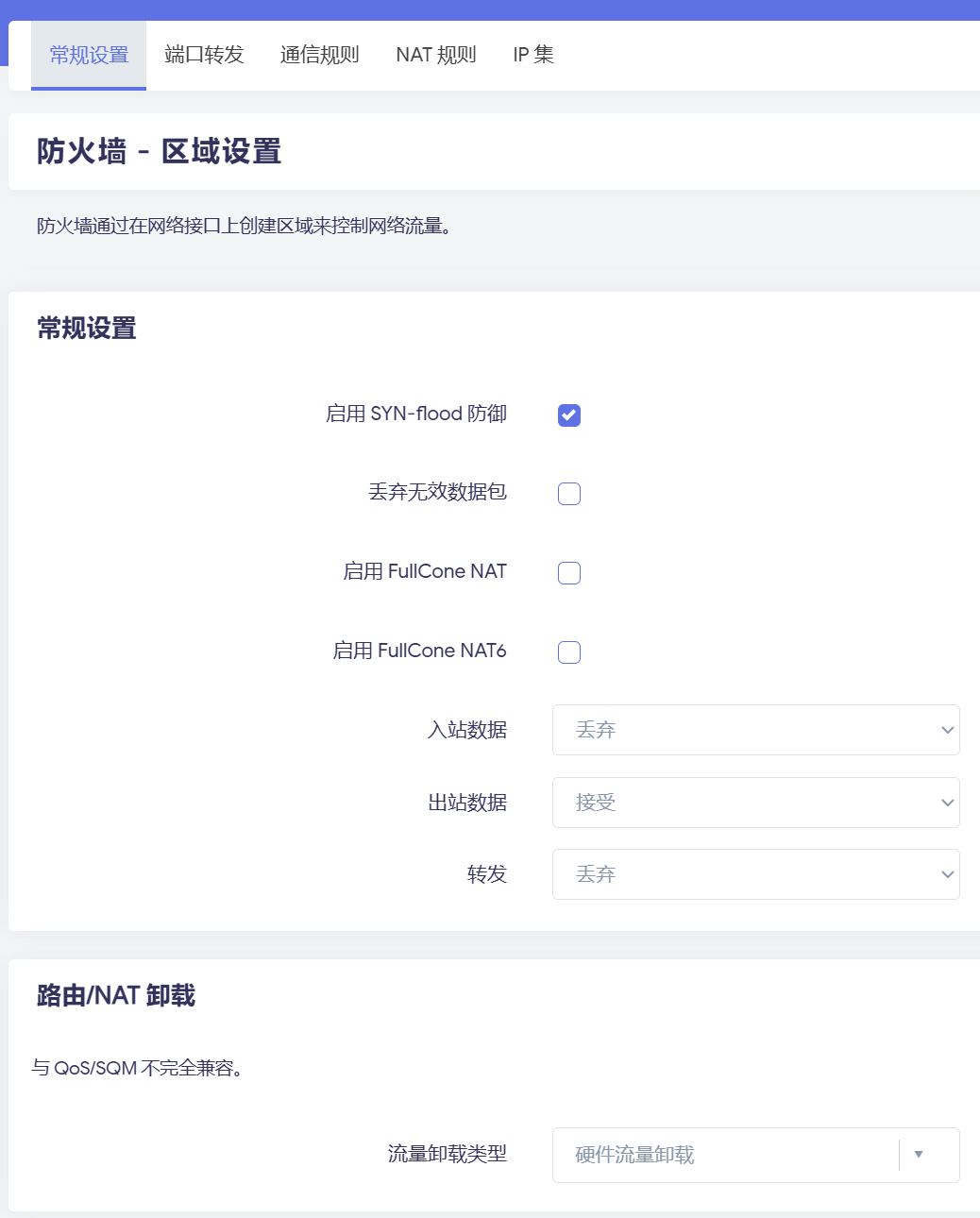
This “Traffic Offload Type” is the key. For some reason it was set to Hardware Flow Offloading. The i350-T4 NIC I’m using shouldn’t support this. Experiments showed that when set to “Hardware Flow Offloading”, nftables would have:
flowtable ft {
    hook ingress priority filter
    devices = { eth0, eth1, eth2, eth3, eth4 }
    flags offload
    counter
}

chain forward {
    type filter hook forward priority filter; policy drop;
    meta l4proto { tcp, udp } flow add @ft
    ...
}
Whereas when set to “Software Flow Offloading”, it would have:
flowtable ft {
    hook ingress priority filter
    devices = { br-lan, eth4 }
    counter
}
In theory, setting this to “Hardware Flow Offloading” shouldn’t actually take effect. According to the documentation, if hardware offload is active, conntrack entries should show HW_OFFLOAD, not OFFLOAD. On my system, whether I chose software or hardware, conntrack always showed OFFLOAD. The weird part is that when set to hardware, long-lived UDP connections (WireGuard keeps trying to handshake every few seconds, so this UDP flow never times out in conntrack) would encounter this MAC address caching issue, but when set to software, the problem disappeared.