
Tinkering with IPTV on a PC
This article is translated from Chinese to English by ChatGPT. There might be errors.
My dad recently retired and has nothing much to do at home. For some reason he’s started to enjoy watching multiple videos at the same time on his PC, and asked me if it’s possible to watch TV channels (mainly Five Star Sports) on the computer. I’d seen some public IPTV channel lists that can be played directly with Potplayer, and I also knew there are solutions to forward China Telecom’s IPTV to a PC, but since I don’t watch TV myself I never had the motivation to tinker with it. Recently I finally gave it a try.
The simplest solution is undoubtedly to find a public IPTV playlist online. For example, this one https://github.com/iptv-org/iptv is truly impressive, it has almost all TV channels worldwide. Unfortunately, several key channels stutter badly and the viewing experience is terrible. So I had to mess around with China Telecom’s IPTV.
The basic principle isn’t complicated either: as long as you have an interface joined to VLAN 85 and obtain an IP via DHCP, you can access China Telecom’s IPTV private network. The next step is figuring out how to let the PC receive IGMP traffic.
Obtaining a private‑network IP
At home, the current network setup is that the optical modem is set to bridge mode, and all ports on the modem are bound to VLAN 85:
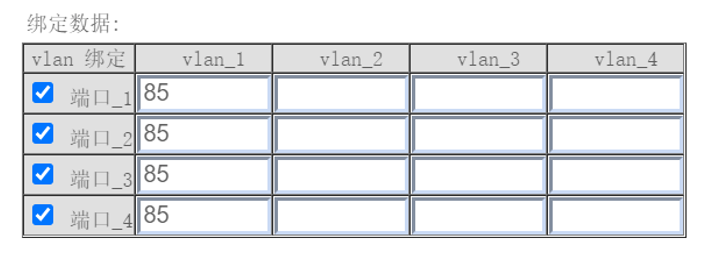
PPPoE is handled by a soft router, the WAN port is named eth3, and the software is Koolshare’s LEDE v2.37. Add the following lines to the network configuration in LEDE:
config interface 'VLAN85'
	option proto 'dhcp'
	option ifname 'eth3.85'
        option defaultroute '0'
	option multipath 'off'
	option peerdns '0'
After saving, you’ll see the new interface automatically obtains a private‑network IP from China Telecom:

Obtaining IPTV traffic
Information online about this part is really messy. Many articles mix several methods together, which is completely unnecessary. I’ve summarized things and there are actually three main methods; any one of them can be used to watch IPTV. Of course, each has its pros and cons:
| Method | Address format when using this method | Pros | Cons |
|---|---|---|---|
udpxy | Use HTTP unicast http://192.168.1.1:4022/udp/239.45.3.210:5140 | Easy to configure, no broadcast storm | Channel switching latency is relatively long |
igmpproxy | Use RTP multicast rtp://239.45.3.210:5140 | Short channel switching latency | Even with IGMP Snooping enabled, if downstream devices don’t support it you’ll still get broadcast storms |
| Use catch‑up addresses | Use RTSP unicast rtsp://124.75.34.37:554/PLTV/...434_0.smil | Supports catch‑up (replay) | Channels that don’t support catch‑up cannot be watched |
I tried all three methods. Below is a brief description of the configuration process.
udpxy
The principle of udpxy is that it listens on a port using HTTP, parses the multicast address and interface to connect to based on the URL rules, and then forwards the traffic. The address here will be the IGMP multicast address of the IPTV channel.
Openwrt has very good support for udpxy. First install it with:
opkg update
opkg install udpxy luci-app-udpxy
Then edit /etc/config/udpxy:
config udpxy
        option respawn '1'
        option verbose '0'
        option status '1'
        option port '4022'
        option disabled '0'
        option bind 'br-lan'
        option source 'eth3.85'
The key options here are bind and source. bind is the internal (LAN) interface to listen on, and source is the interface that has the private‑network IP configured. After udpxy starts, you can check its status via http://192.168.1.254:4022/status.
Another advantage of using udpxy is that you hardly need to touch the firewall. You don’t need forwarding support, you don’t need NAT on the private‑network interface; you only need to allow inbound from the LAN (which is usually enabled, otherwise you couldn’t access LEDE at all).
After configuration, you can try opening an address with Potplayer to see if it plays.
Catch‑up addresses
This method mainly comes from this repository. A few years ago the addresses in this repo seemed to be accessible from the public internet, meaning anyone with internet access could watch them. Later they were blocked by China Telecom and can now only be accessed through the IPTV private network. Also, these addresses are not live streams but catch‑up streams, so we don’t know how much delay there actually is. The following explanation is quoted directly from the author:
This playlist uses the IPTV channel catch-up (time-shift) function. IPTV live streaming uses private-network multicast and cannot be played directly over the Internet. Since not all channels support catch-up, the channels in this list are necessarily fewer than the IPTV live channels.
The principle of this method is simple: we just need to route the relevant IPs via the IPTV private network.
First, in the LEDE firewall, enable “IP masquerading” (NAT) for the private network, and set forwarding to “accept”. Set forwarding from LAN to the private network to “accept” as well.
Then add several routes to make these addresses go through the IPTV private network instead of the default gateway. The command format is as follows:
ip route add 124.75.34.0/24 via 23.x.x.x dev eth3.85
The 124.75.34.0/24 part has many entries and needs to be collected by using Wireshark to capture packets while following redirects again and again. I only tested a single channel, which redirected twice, so I ended up with three addresses. Some addresses are summarized in this Issue and can be used as a reference.
The 23.x.x.x part should be replaced with the private‑network gateway. This information should normally be obtained via DHCP, but I couldn’t find the DHCP logs, so I had to rely on blind guessing—using the highest address, i.e. broadcast-1 in the local subnet—and it actually worked.
To put this method into formal use still requires some engineering work, such as collecting IP ranges and writing a script to handle changes to the DHCP‑obtained address, so I won’t be using it in practice.
igmpproxy
This method cost me a lot of time. Its general principle is described quite clearly in the Openwrt documentation. Roughly speaking, you run igmpproxy on the router; it uses a raw socket to listen to all packets with IP protocol 2 (IGMP). When it detects a packet requesting to join a multicast group, it sends a join packet to the private network on behalf of the client and adds a route entry for that group; the rest of the traffic is then handled by the routing table.
First install it:
opkg update
opkg install igmpproxy
Then edit the configuration file /etc/config/igmpproxy:
config igmpproxy
        option quickleave 1

config phyint
        option network VLAN85
        option zone VLAN85
        option direction upstream
        list altnet 0.0.0.0/0

config phyint
        option network lan
        option zone lan
        option direction downstream
        list whitelist 239.45.0.0/16 # see below
Finally, start it using service igmpproxy restart.
This configuration file is described in detail in the documentation. The zone option cannot be omitted, because the startup script uses this field to add several iptables rules so that UDP traffic can pass through properly.
On the firewall side, this method doesn’t require IP masquerading (NAT). Under normal circumstances, forwarding rules will be added to the firewall when igmpproxy starts (it must be started via the script). If it still doesn’t work properly, you can try enabling forwarding between the LAN and the private network.
After configuration, opening rtp://239.45.3.210:5140 with Potplayer should work.
Now to talk about the pitfalls of this method.
First, there’s the issue mentioned in this Issue: igmpproxy seems to forward 224.0.0.0/24 traffic, which is local traffic and shouldn’t be forwardedigmpproxy has added support for a whitelist configuration, which is the line I added above. However, the Openwrt configuration tools don’t support this option, so adding that line is effectively useless. This problem led to another issue where Velop stopped recognizing the network and the indicator light turned red (though internet connectivity itself was fine). The Linksys software is garbage. (Update on Feb 5: this issue has been resolved and was not caused by igmpproxy; see this article)
Second is the reason I ended up tinkering for so long, though it isn’t really a problem with igmpproxy itself but with my PC. When IGMP joins a multicast group, the client sends a Membership Report packet, like this:
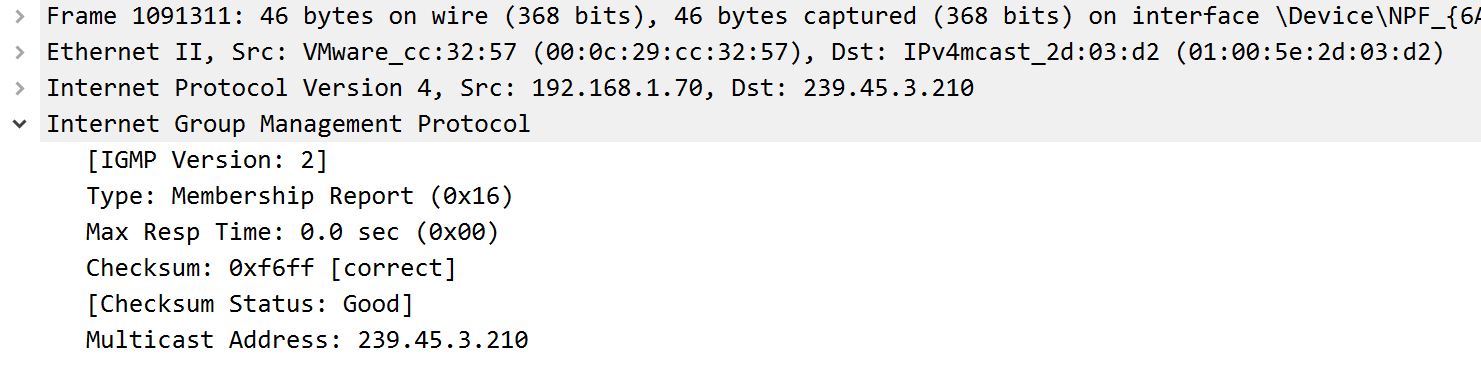
However, on my PC this packet simply would not be sent. I used a virtual machine to boot up a Windows and an Ubuntu instance, and testing finally confirmed it wasn’t a configuration issue with igmpproxy, because the VMs worked fine while the host machine itself refused to send the packet. Turning off Windows Firewall didn’t help either. This issue remains unresolved; I don’t feel like tinkering with it anymore.
EPG and KODI
In the end I decided to stick with the udpxy method. During my research I found people mentioning EPG, short for Electronic Program Guide, which can be combined with KODI to achieve a pretty nice result:
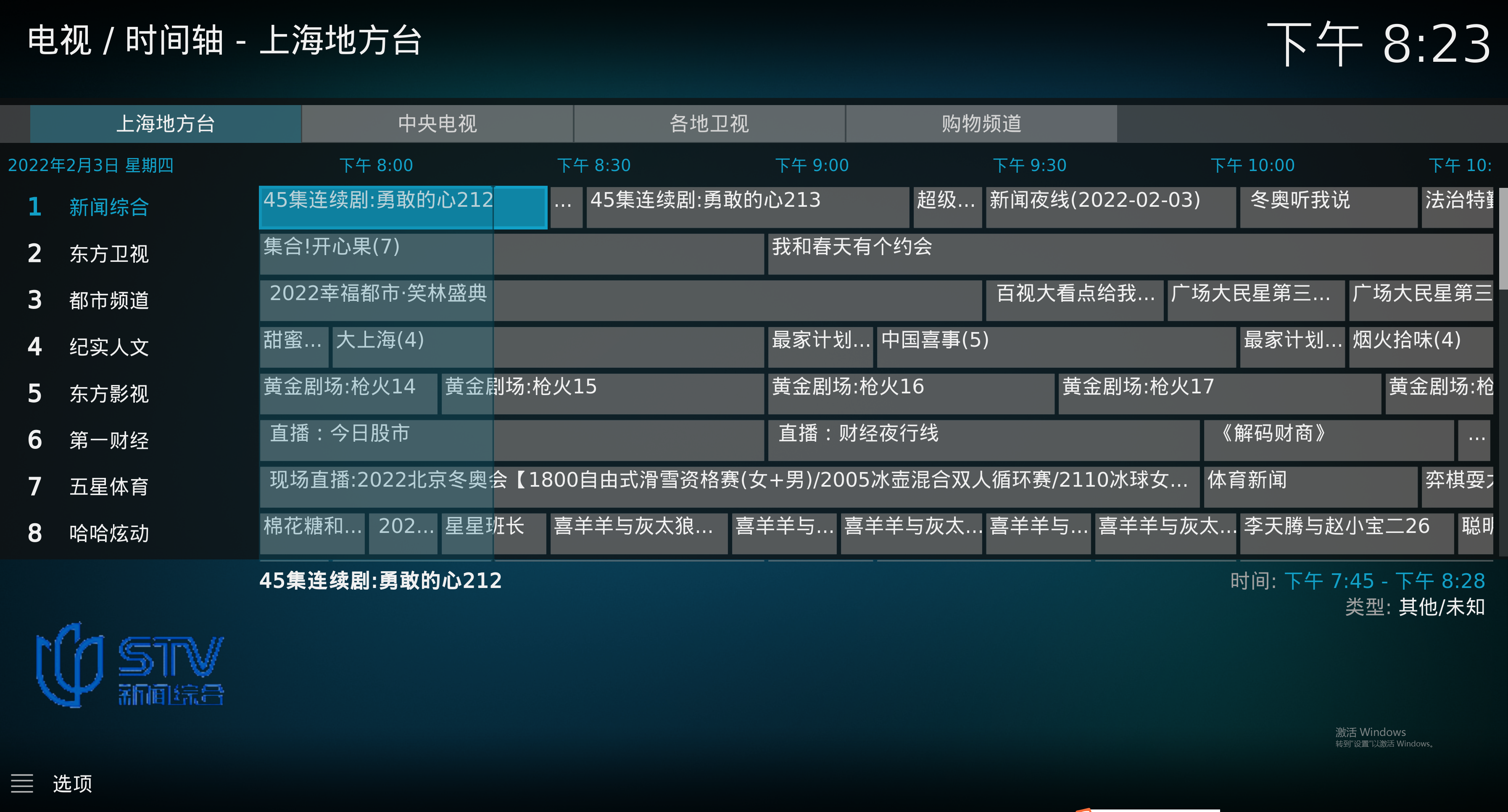
This is mostly configuration work. You can refer to KODI’s documentation and the channel list provided by a user in this comment.
References
- 不能用KODI看的IPTV不是真4K https://post.smzdm.com/p/alx7n2ke/
- 电信公网疑似已屏蔽回放源IP https://github.com/lucifersun/China-Telecom-ShangHai-IPTV-list/issues/28
- 给Kodi直播电视添加电子节目单EPG 电视节目指南 http://www.kodiplayer.cn/course/2925.html
- 频道抓包结果(包括节目名称) https://github.com/lucifersun/China-Telecom-ShangHai-IPTV-list/issues/35
- 上海电信iptv最全的组播地址 12月5日新鲜出炉未分类 https://www.right.com.cn/forum/thread-724974-1-1.html
- Openwrt与IPTV之一——igmpproxy https://www.cnblogs.com/harryzwh/p/4279316.html
- Openwrt与IPTV之二——udpxy https://www.cnblogs.com/harryzwh/p/4279335.html
- IPTV共享之填坑篇+组播地址 https://wp.gxnas.com/4058.html
- 「IPTV 与互联网融合」全解析 igmpproxy udpxy IGMP RTSP 抓包 直播源 四川 电信 https://www.right.com.cn/forum/thread-2470633-1-1.html
- IPTV融合进普通网络一般步骤 https://www.right.com.cn/forum/thread-248400-1-1.html
- 利用OpenWrt系统拓宽IPTV使用范围 https://www.red-yellow.net/利用OpenWrt系统拓宽IPTV使用范围.html
- How IGMP operates https://techhub.hpe.com/eginfolib/networking/docs/switches/K-KA-KB/15-18/5998-8164_mrg/content/ch01s08.html
- IPTV / UDP multicast https://openwrt.org/docs/guide-user/network/wan/udp_multicast
- Filter all local multicast https://github.com/pali/igmpproxy/issues/61