
Recommending a Few Apps
This article is translated from Chinese to English by ChatGPT. There might be errors.
I haven’t updated my blog for a long time. Since I don’t have the habit of keeping records, many times after solving a problem I’d think about writing it down to share, but then I’d feel that not many people would read it anyway, so I’d drop it. But ever since Gu Guofei forced me to read papers, I’ve realized that not taking notes doesn’t work: by the time I finish the next paper, I’ve already forgotten the previous one and can’t grasp the key points at all. I recently switched to an iPhone, and in order to improve efficiency I’ve tried a bunch of apps. I’ll recommend some of them here, and also talk a bit about the NAS I bought during last year’s Double 11.
NAS
Let’s start with the NAS. A long time ago, because my hard drive space was insufficient, and sharing movies from a desktop was inconvenient—you have to remote in and shut down the machine after watching—I started thinking about buying a NAS. During last year’s Double 11, JD.com had a Bai Tiao promotion with 24 interest-free installments. Although the price was still a bit higher than buying overseas, it was acceptable, so I gritted my teeth and bought a QNAP 453-Pro, plus two 4 TB Red drives.
I’ve been using it for almost half a year now. Although my initial requirement was just to share videos over SMB, I later realized that a NAS can do far more than that, to the point that I can hardly live without it now. I won’t talk much about SMB; instead I’ll introduce the three functions I use the most.
BitTorrent Sync
BTSync is a synchronization tool. At first I used QNAP’s own QSync and found it terrible: it kept scanning the disks, and when files actually changed it often didn’t react. Later I found BTSync in the App Center. Its sync performance is nearly perfect, the response to file changes is very fast, and it handles well as long as the number of files is below the millions level (I don’t even have a hundred thousand yet). I now have BTSync installed on the NAS, my desktop at home, my laptop, and my lab computer. Changes I make on the lab computer are immediately synced to the NAS; when I get home and turn on the desktop, they are synced over from the NAS right away. It’s truly essential both at home and on the road.
WebDAV
WebDAV is a built‑in NAS feature that allows remote hosts to access files on the NAS. FTP can actually provide similar functionality, but unfortunately tools on iOS generally don’t support FTPS (FTP over SSL), only SFTP. However, SFTP and FTP are actually two different things; enabling SFTP on the NAS requires enabling SSH. I don’t want to keep SSH on all the time, nor do I want FTP traffic going across the Internet in plain text, so I had to give up on FTP. I ultimately chose WebDAV because it is supported by the vast majority of iOS apps and can also use HTTPS for secure transmission. If BTSync is used for synchronization between computers and the NAS, then WebDAV is for synchronization between mobile devices and the NAS. For example, I use GoodReader to read a paper on the iPad and make some annotations. Afterwards I use GoodReader’s sync feature to sync with the NAS, then sync again on my phone, and the modified paper gets transferred over. Meanwhile, files stored on my computer are also synced over via BTSync.
Container Station
Container Station is QNAP’s packaging of container technologies like Docker. Initially I was using Virtualization Station, i.e., full virtual machines, but NAS performance is mediocre, virtual machines are slow, and everyone knows VM management overhead is high. After discovering Container Station, I spent some effort migrating all the functions that were running in VMs into containers. Right now I mainly run two services in containers: an nginx reverse proxy and a squid HTTP proxy. The nginx reverse proxy is there because some NAS apps don’t support HTTPS (such as the web control pages of transmission and BTSync). I can no longer tolerate HTTP in plain text; everything must be encrypted, so I use nginx to wrap them in HTTPS externally. Squid is technically an HTTP caching server, but I use it as a proxy, because the network in the lab is awful, while my home Internet connection is decent. So when I’m in the lab, I browse the web through my HTTP proxy server at home. There’s another benefit: the Merlin firmware I flashed on my router has built‑in Shadowsocks and can transparently bypass the Great Firewall, so by using squid I can directly “climb over the wall”.
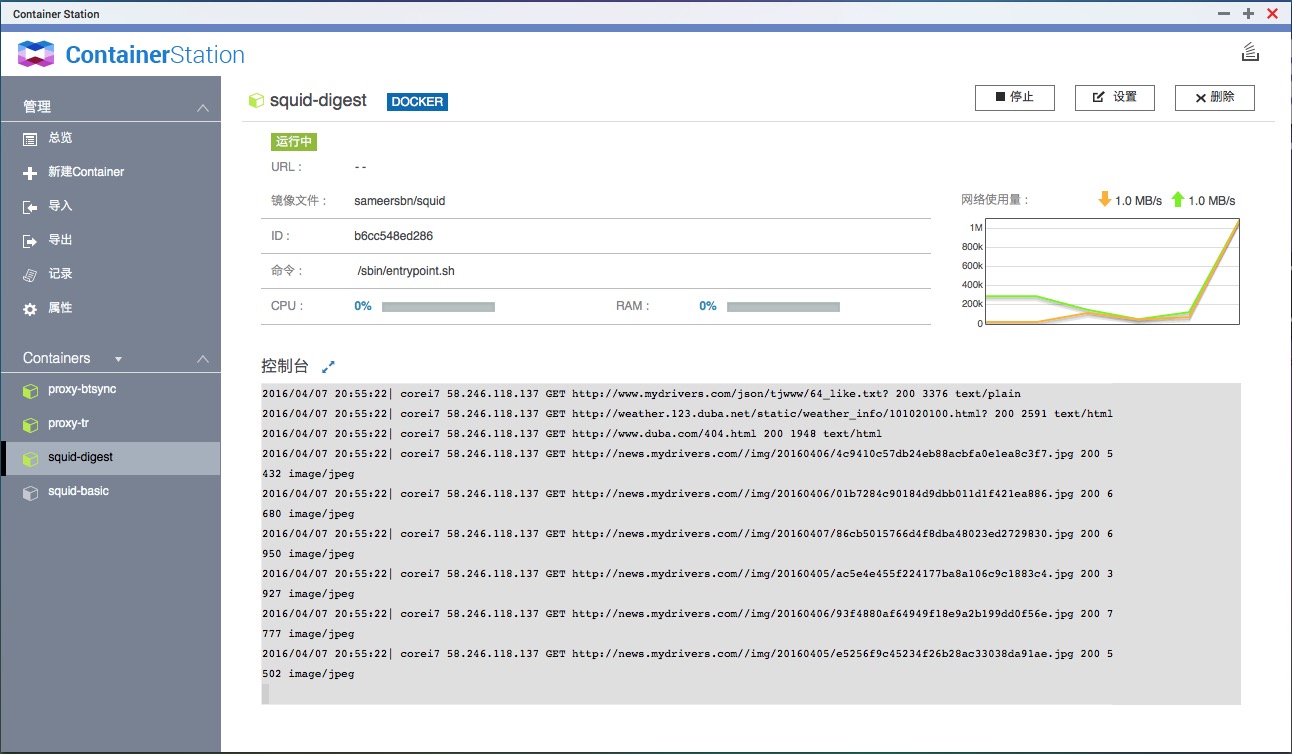
I also put in some effort so I could see squid logs directly in the console. With Docker’s Volume feature, I can place configuration files in a BTSync‑synced folder. This way, if I want to modify the squid configuration while in the lab, I only need to edit the local config file; after a short while BTSync will sync the changes to the NAS, and then I just restart the container in Container Station. For safety, I made two versions of squid: one using digest authentication and one using basic authentication; the latter is only started when I’m using software that doesn’t support digest authentication.
Productivity apps on iOS
As mentioned earlier, I only recently switched to an iPhone, so I’m pretty enthusiastic about discovering iOS apps. I already had an iPad before, but the use cases were different, so the motivation was different as well. I’ll introduce a few I’ve discovered recently; I’ll talk about more if I find good ones in the future.
Evernote + Marxico
Evernote needs no introduction; everyone knows it. Although its popularity seems to have declined somewhat in the past two years, it’s still quite usable. OneNote, on the other hand, is practically unusable due to its terrible sync speed. Marxico is something I only started using recently. I used to use CmdMarkdown from 作业部落 as my Markdown editor. After upgrading to a premium account, CmdMarkdown can also sync to Evernote, but compared to Marxico it has one fatal flaw: it doesn’t support directly pasting images. This single feature alone is reason enough to use Marxico. After switching to Marxico, I can directly input formulas when taking notes on papers, which is absolutely refreshing.
Papers
Papers is a reference manager. It lets you search for papers in various databases using different fields and sync your paper collection across devices. There’s also a Mac OS version. I haven’t used it in much depth though. First, because I still primarily use GoodReader to manage PDFs—I’m not genuinely keen on doing research, I’m being forced into it! Second, the campus network is so bad that I’m at a loss for words. The Wi‑Fi is somewhat better; the lab network’s ability to connect to those literature databases depends entirely on its mood, which really ruins the experience.
AppZapp
AppZapp has a simple function: price‑drop alerts for apps, so you’ll never miss another free promotion.
Wunderlist
I discovered this app while browsing Zhihu for app recommendations. At first I wanted to try the famous GTD tool OmniFocus, but unfortunately it’s too expensive, and according to reviews it doesn’t seem suitable for a casual user like me. So I tried Wunderlist and found it quite nice. I just use it as a simple list: I put all the movies, books, and papers I want to go through on it, and it feels great to cross each one off after I’m done.
iThoughts
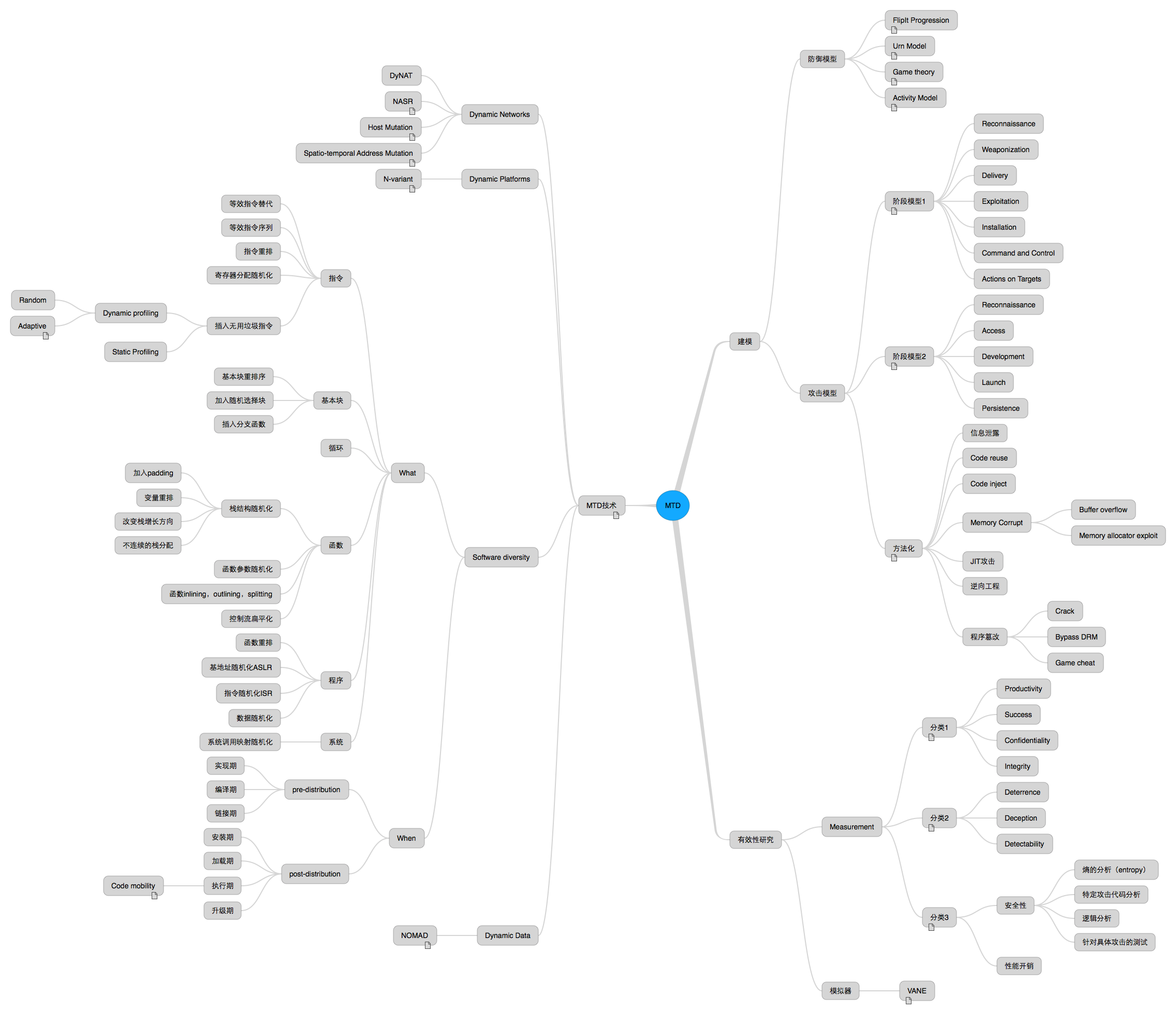
In this week’s meeting, Gu Guofei asked me to do a summary, which reminded me of mind maps I’d seen before—perfect for summarizing an MTD. Zhihu experts recommend all sorts of mind‑mapping apps: iThoughts, MindNode, SimpleMind, MindManager, etc. I casually tried iThoughts and found it fully met my needs, so I didn’t bother trying others. iThoughts is paid on every platform, and not cheap. I’m currently using a pirated copy of iThoughts on my Mac (don’t yell at me), and on iOS I use iThoughts2go, which is the free version of iThoughts. Compared with the full version, it only limits the number of nodes (no more than 20), while all other features are the same. So I first edit on the Mac, then sync to my phone and iPad. I’ve added iThoughts to my AppZapp alert list and will buy it as soon as it goes on sale (it’s dropped as low as 12 RMB before…). Here’s a screenshot of the MTD summary I made with iThoughts.
Finally, about the blog
A year ago I said I wanted to change the blog theme, and only finished it today, which is quite embarrassing. The new system is based on Jekyll and uses Hux’s template—many thanks to him. I switched the comment system to Disqus and added on‑demand loading of MathJax myself. The new template looks much better than the old one. I didn’t host the blog on GitHub and point a CNAME at it, because in that case I wouldn’t be able to use HTTPS. As mentioned earlier, I now absolutely loathe unencrypted HTTP. The current setup only adds one extra step: manually running jekyll build on the VPS after finishing an article, which isn’t a big deal.
This post was originally going to be about recent events. Lately the pressure has been really overwhelming. As I told a friend: “If I can’t get a paper published I can’t graduate, I can’t find a job, I can’t find a girlfriend, and even in LOL I got placed in Bronze—total life loser.” But then I thought I’d better leave it at that and not spread more negative energy. Life has to go on; as long as you’re not dead, there’s always hope.