
Site Equipped with HTTPS and SPDY
This article is translated from Chinese to English by ChatGPT. There might be errors.
Using HTTPS is clearly the general trend; in the future all websites should adopt HTTPS encrypted connections to ensure security and privacy.
All of Google’s sites have fully enabled HTTPS. According to Google, the overhead introduced by HTTPS is very small. However, in actual use the latency caused by the HTTPS handshake is still quite noticeable, especially when using HTTP/1.1, where multiple connections to the server are usually established and each one has to go through the HTTPS handshake.
The SPDY protocol developed by Google (which later became the template for HTTP/2.0) can effectively overcome many shortcomings of HTTP/1.1. SPDY itself does not have to use HTTPS, but Google’s implementations (including Apache’s mod_spdy and the Chrome browser) all require SPDY to be transmitted over HTTPS. Since SPDY is driven by Google, everyone has basically accepted this. SPDY uses only a single connection when communicating with the server, so the HTTPS handshake happens only once, which largely eliminates the overhead introduced by HTTPS. Techniques used by SPDY such as framing and header compression can effectively overcome problems like head-of-line blocking and oversized headers in the HTTP/1.1 era, thereby improving HTTP performance.
Most modern browsers now support the SPDY protocol, including IE11, Chrome, and Firefox. On the server side, Apache has mod_spdy, and newer versions of nginx have built-in SPDY support; you only need to add the --with-http_spdy_module option at compile time.
The version I’m using is nginx 1.6.2. The nginx version in Ubuntu 14.04’s official repository is relatively old and cannot enable SPDY with simple configuration, so I added nginx’s PPA: add-apt-repository ppa:nginx/stable. After that, installing nginx gives you version 1.6.2. To configure nginx, just change listen 443 ssl to listen 443 ssl spdy, and that’s it—very simple.
You can inspect SPDY sessions with Chrome by entering chrome://net-internals#spdy in the browser. When there are SPDY sessions, it looks like the following:
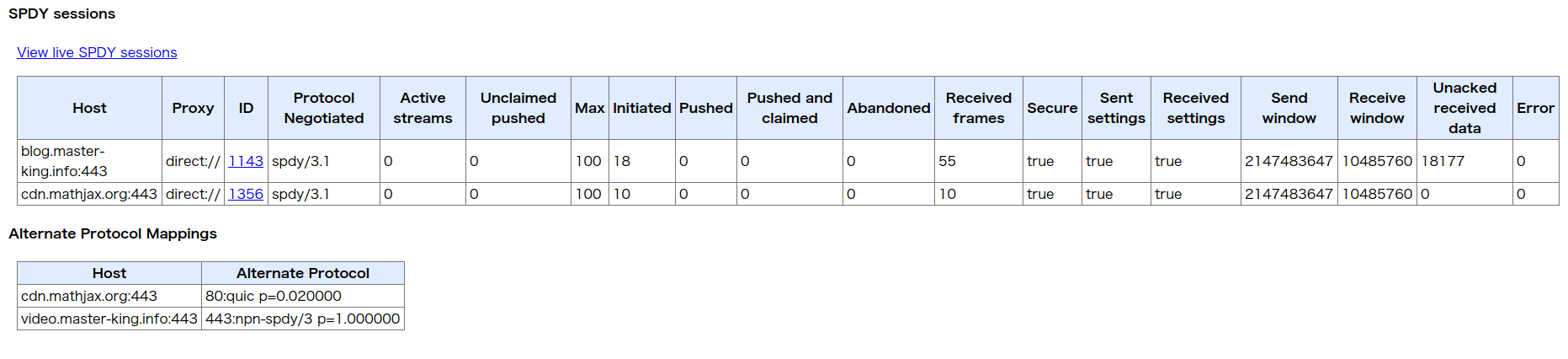
The actual experience has been pretty good; compared to the original HTTP setup, the difference should be minimal. Overseas servers will always drop some packets more or less, and TCP’s retransmission mechanism limits SPDY’s speed, but it’s still within an acceptable range.
Another issue that appeared after enabling HTTPS is that the page contained HTTP requests to other domains. Things like MathJax and Duoshuo comments are external resources. As soon as these HTTP connections exist, the browser will issue warnings, and the green padlock in Chrome will show a yellow exclamation mark, which is quite annoying. After some investigation I found that MathJax’s CDN supports HTTPS and Duoshuo’s main framework also supports HTTPS, but Duoshuo’s avatars and emoticons always use HTTP. A brief search did not turn up a good solution, and since I have a bit of OCD and can’t stand these warning messages, plus the blog’s traffic is almost zero and no one comments anyway, I simply disabled Duoshuo.
Using someone else’s template for a blog always feels a bit awkward—you can’t fully control it, and it’s inconvenient when you want to tweak things. So once I finally make up my mind, I still have to write my own; it feels like a fair amount of work.
While configuring nginx I also came across some interesting things, like using nginx as a reverse proxy for Google. It seems quite practical, and it looks like a new round of tinkering is about to begin.